Highlight block
This option allows you to set a coloured background to highlight the block.
Block width
You can set the width of your block here: 33%, 50%, 66% and 100%
This option can be very useful to organize photos inside your pages.
Once an image for the block is chosen, the following options will be active:
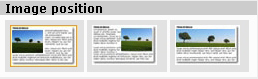 Image position
Through this option you can select the image alignment in the block.
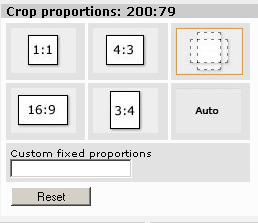 Crop proportions
you can set the proportions for the crop in order to mantain uniformity among the images in the page.
There are four preset values:
- 1:1 (square)
- 4:3 (standard television)
- 16:9 (enlarged television)
- 3:4 (portrait)
"Free" that allows you to draw a crop with free proportions.
"Automatic" crop uses proportions automatically chosen by the system.
"
Custom fixed proportions" allows you to enter a free ratio (eg: 220:300).
Note that the present proportions are shown beside the title, to allow cut and paste among different blocks to mantain uniformity when proportions that differ from the preset ones are selected.